Pages

Ads 468x60px

Labels

Showing posts with label Software. Show all posts

03 December 2011

Iphone Error Code Collection With Solution


Errors -9815
Set exact date, restart computer. See also Apple's KB article.

Errors -9814

Set exact date, restart computer. See also Apple's KB article.

Errors -9800

Set exact date, restart computer. See also Apple's KB article.

Error -50

Delete Storm Vedio, QuickTime, iTunes, then reinstall iTunes. See also Apple's KB article.

Error -35

See Apple's KB article.

Error 1

Unable to downgrade. Try changing the USB port (the back one of chassis is better) and restart computer.
The installed version of iTunes may also be too old. Update iTunes.

01 October 2010

How To Installing Chinese Input On The N900

The Nokia N900 is a qwerty MID touchscreen smartphone that’s running Maemo 5 Linux as it’s operating system.


Pros:

- Running Maemo 5 = Running Linux = Many open sourced options

- Display of 800 x 480 @ 3.5″ screen

- QWERTY Keyboard

- 5 megapixel Carl Zweiss Tessar lens camera

- Supports Adobe Flash 9.4

- CPU running ARM Cortext A8 (500 MHz)

- Storage: 256 MB Nand, 32 GB eMMC

- Memory: 256 MB Mobile DDR, 768 virtual swap space

- GPU running PowerVR SGX 530 supporting OpenGL ES 2.0

- 3.5mm audio

- A2DP with Bluetooth v2.1

- Activesync (Not tried)

- SyncML

- IRPort


Cons:

- QWERTY Keyboard has no ESC key. (I suppose you can remap it since it’s running linux)

- Weight 181 grams


Anyways, enough of the phone, let’s get to the main topic, installing chinese IME on this phone. Interestingly, penpower actually has free input software for the nokia n900. Of course, this is due to the hard work of the folks who are modifying mscim for n900 in the first place, but seriously, the pp software really kicks ass.


If you can read chinese, you don’t need this guide, and you can just follow the instructions here: http://www.penpower.net/nokia/n900/chinese-cn.htm


Otherwise, follow these steps:

- Access phone menu (touching the top left, where there are six squares)

- Select “More..”

- Select “App Manager”

- Select “Application Manager” dropdown

- Select “Application catalogues”

- Select “New”


Enter the following: (Only the web address and distribution are important.)


Catalogue name: Maemo Extras-devel

Web address: http://repository.maemo.org/extras-devel

Distribution: fremantle

Components: free non-free

Do not click the “Disabled” checkbox


- Select “Save”

The Application Manager will reload the applications you can install from this new repository.


- Select “Application Manager”


Search for, and install these applications in the following order:


- mscim

- n900-locales-ppchinese

- mscim-n900-ppinputmethod


At this point, you can go to the system menu, settings, language & region, device language > and select either “chinese prc, chinese taiwan, or chinese hongkong”


To activate/de-activate the PowerPen ime, hold the CTRL + SPACEBAR.


To de-activate certain input methods, you can goto system menu, settings, MSCIM input methods.


There’s several input methods, in my opinion, it’s better than the free stuff you can install on your windows computer.


- Stroke based keyboard input system (Select 木 three times, and a 森 will appear)

- There is another kind of stroked based keyboard input system but I’m not familiar with usage

- QWERTY Pinyin input

- Handwriting input

Complete

26 September 2009

Nokia 5130XM RM-495 CareDP 15.0 06.94

Firmware Update Nokia 5130 XpressMusic
RM-495 CareDP 15.0 06.94
Major Data Package v15.00 MCU SW 6.94
File Name : RM-495_CareDP_15.0_06.94.exe
Published 15/09/2009 Size 111.0 MB
Region : GLOBAL

DOWNLOAD


.

17 March 2009

OGM JAF FULL CRACK PKEY Emulator v5 - NO PKEY NEEDED - JAF Vodafone added

Specially for user without JAF box and only have HWK. JAF Crack Emulator v5

..:: OGM JAF CRACK FULL PKEY Emulator v5 - NO PKEY NEEDED - JAF Vodafone added ::..

Free OGM PKEY Emulator v5 features:

- NO PKEY required - as usual !!!
- Work with JAF addon BB5 NO TP Unlocker by Cinek 1.04
- Work with all JAF original setups (1.98.62 too).
- Work with JAF addon JAF VODAFONE/QUALCOM Addon V1.02
- Can access JAF support area (all servers, Raskal servers, Thomas servers)!
- Change emulated PKEY SN to many random values.
- Allow manual selection of emulated PKEY Serial Number
- Allow manual selection of emulated PKEY kind (Raskal PKEY, Thomas PKEY)
- Full lifetime counter for emulated PKEY at each software start
- For PKEY emulation used applets from original JAF 1.98.62

ENJOY THIS JAF CRACK EMULATOR!

Download Link : JAF Crack By OGM v5

For Old Version JAF Crack clik read more


Download Link:JAF CRACK By OGM v3
Download link:JAF Crack By OGM v4


29 October 2008

Garmin Mobile XT for Symbian S60 3rd Edition Chinese version 5.00.00 by Cky


 This Garmin Mobile XT application is designed for use on Symbian smartphone devices running S60(ie. Nokia E6x, Nokia N7x) 3rd Edition OS .
* You must have a previous version of the XT software installed on your SD card to have all of the help files, voice files and basemap files. These are not included with this update.
* During installation, you will be prompted to turn on your Garmin GPS. Please Note: You will not gain access to Garmin Online features and/or the navigation will be unavailable without connecting your Garmin GPS.
* A minimum card size of 256 MB is recommended for Garmin Mobile XT software with maps.
* Please save all appropriate data before beginning the update.


Change History
Changes made from version 4.xx.xx to 5.00.00:


* Update the look and feel of the Garmin Mobile XT application.
* Add new Garmin Online feature - Google Local Search.
* Add new Garmin Online feature - Panoramio Photos.
* Add new Garmin Online feature - Flight Status.
* Add Speed Limit display to the View Map.
* Add ability to install and display custom vehicle icons.
* Modify 'Peerpoints' feature name to 'Location Message'.


Installation Instructions


1. As with any software update, you should always create a backup of the data on your device before beginning. Please see the information provided in the user manual for your device for more information.
2. To import your existing saved settings/waypoints/routes/tracks after you have updated to the latest version, you will need to export them to the SD card at this time. Select Tools->Manage My Data then select the Manage option. Select Export GPX. This will create a file on the SD card that contains all of your saved information. Select Done and Exit the application when this is complete.
3. Copy the following file from the SD card to a safe location (this file will be used to import your saved information later):
(SD card)\Garmin\GPX\CURRENT.GPX
After copying this file, delete the file from the SD card.
4. Insert the SD card into your card reader. (Applicable for most Symbian OS devices - some Nokia phones offer 'Data Transfer' mode when connected to the PC and will allow the phone to act like a USB card reader.)
5. To begin the SD card setup, select the 'Download' link found on this web page.
6. Select to 'Run' or 'Save' the file. Selecting 'Run' will immediately launch the install program. Selecting 'Save', will save the file to your PC and require you to launch the install program from the saved location.
7. If you receive an error copying the files to the destination SD card, you will need to manually browse the card to remove the following two files:
(SD card)\Garmin\Apps\Symbian\res\GarminMobileXT.SIS
(SD card)\private\10202dce\GarminMobileXT_PA.SIS
Rerun the file downloaded from the link on this web page (Step 5).
8. Follow the directions provided when running the downloaded program and directions provided on the device display to complete the application update. Insert the SD card into the phone (if necessary). If the installation/update does not occur automatically upon insertion of the SD card into your device, browse to the SD card root directory and manually run the GarminMobileXT.SIS file.
9. Exit the application (if necessary). Copy the CURRENT.GPX file saved in Step 2 to SD card location: \Garmin\GPX\CURRENT.GPX
Replace the existing file on the SD card if necessary.
10. Start the application. The import of the data should happen automatically. If it does not, select Tools->Manage My Data then select the Manage option. Select Import GPX. Your saved application data should now be available.
11. You will need to keep the SD card inserted in your device for the voice, help and basemap files. This SD card can also be used to hold your detailed maps


Simplified Chinese, Traditional Chinese

09 October 2008

JAF Software New Updates 8/10/2008

JAF Setup 1.98.60 ready...

- added latest ini for BB5 tp unlock
- latest language ini file
- added support for N96 usb flashing. FBUS mode will be implemented in future versions. However with usb dead mode you can revive dead phones also.
- added latest flash loaders to support N96
- other small reported bugs fixed


JAF Setup 1.98.61 ready...

-reverted to old loaders. Now it's all fbus phones are working again. N96 it's supported for USB only.


14 July 2008

Chat Box Widget

I just added chat box widget in this blog you can used it for asking question I will try to answer all question as soon as possible (if I got time) J


12 July 2008

Nokia N78 "over-the-air" software version 11.043 released

Nokia just release it first software upgrade by "over-the-air"
technique for nokia N78. This "over-the-air" software release will not
be available through the Nokia Software Updater application, but is
available directly through your Nokia N78. The release includes improved
stability with Bluetooth (headsets and car kits) and music (playback
over a long time and content refresh). This release also includes
optimized Camera performance and Naviscroll sensitivity improvements.

Technology innovations mean the size of this "over-the-air" update is
approximately 2 MB. To get this software through your Nokia N78, click
Menu > Tools > Utilities > Device Manager. Select Options > Check for
updates and follow the on-screen prompts. Remember that you can also use
Wi-Fi to download the update.

Nokia provides this software free of charge. However, costs for
downloading may be charged by your network operator or service provider.
Please contact them for information about pricing.

As with all software releases, note that your mobile service provider,
operator, or carrier may not have approved this release. Nokia produces
many different variants of each product (for different countries and
languages) and not all variants have the latest Nokia device firmware.
It is our priority to update all variants as quickly as possible.

20 June 2008

Sony Ericsson Quick Reparing Guide...

Hi all, this month is very busy month i have. That why it only few new post on this month. ok let cut the case :)

I just found nice gadget for all mobile technician. look at the picture


Click Read More For Download Link.

This is quick guide for repairing sony ericsson mobile phone written by blackattack. you can download it by clicking on link below.

Enjoy It ...

DOWNLOAD IT HERE


27 May 2008

SymbianOS 9.2 Hacking


Download ActivePython and install.

Download and install PySerial.

Download and install AppTRK (in your Handphone).

Download Hack Perms.

After that, follow tutorial below:

Connect your phone to your PC via USB in PC Suite mode.

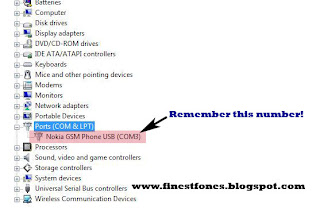
Go to Control Panel>System>Hardware>Device Manager>Ports OR in Windows Vista it's Control Panel>Hardware and Sound>Device Manager>Ports.


Once you're there, look for your phone, in my case it's called 'Nokia GSM Phone USB (COM3)'. Make a note of the number after COM, you'll need it later.

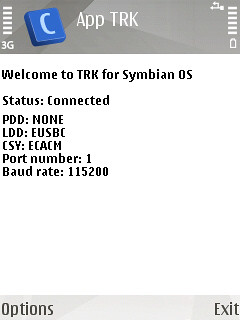
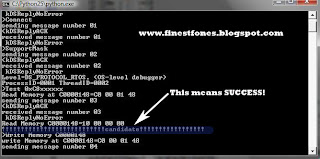
Open AppTRK on your phone and press cancel when it trys to connect via bluetooth. Go to options>settings>connection and change it to USB. Go back and press options then connect. This is what you should see:


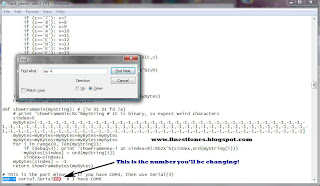
Now open up the Hack Perm python file in notepad on your PC, press CTRL+F on your PC and search for "ser =" (Without quotation marks, of course). Once you're there change the 5 that's in the brackets to the 1 less than the number that followed COM in the step above.


For example, if your number was 7, you would change the number in the brackets to 6 and if your number was 5, you would change the number in the brackets to 4. Once you've done that, save the python file (JUST SAVE, NOT SAVE AS).

Once you have done this, just double click the Hack Perms file and wait for about 5 seconds, during this time, you should see this, notice the "!!!!!!!!!!!candidate!!!!!!!!!!!", this shows you've been successful:


Now to make the hack computer-free:

Download THIS file and copy the contents to a folder in your phone.

1) Using your file manager of choice copy the CProfDriver_SISX.ldd file into C:sysbin.
2) Install CapsOn and then install CapsOff.

That's it! Whenever you want to run the hack just select CapsOff and the hack will be working! No need for a computer! If for some reason you want to turn off the hack just select CapsOn... Yes, it really is THAT EASY.


DONE!

Things to note:

1)I will not be held responsible for anything happening to your phone. Nothing bad should happen anyway.

3)This hack has been confirmed on the N95, N95 8GB, N82 and some others. If you perform this hack, please tell me your phone model.


Don't forget to check out how to install unsigned apps here.

Here's to a bright future for the now truly open S60!

10 May 2008

HTC P3450 Direct Sim Unlocking

Enjoy Free Unlimited Unlocking HTC TOUCH P3450..

No need to pay anymore..Remember it is freee......

Click Read More for full details

1. Connect your Phone and establish Activesync Connection.
2. Install 'Cert_SPCS.cab' and 'EnableRapi.cab' on your device.( Copy them to your devide and run).
3. Run 'Touch_Unlock.exe'.
4. Open the file 'Unlock_result.exe' generated upon execution with Hex Editor.
5. The eight-character code beside the IMEI number in the file is your Unlock code.

Enjoy !!

Download Here

07 April 2008

Sony Ericsson ---> Tutorial | Installing / Fixing / Uninstalling Usb Flash Driver(s), A little tutorial on how it's done.


© Mr.Thunderbird
- For ANY form for copying off this tutorial, I MUST be informed.


++UPDATED++[24-02-08] [FINAL]


Okay guys, I've seen a lot of people with USB Flash

Driver Questions/Problems, and I hope this guide will solve some of the questions like;

"What is USB Flash drivers?"
"How do I install USB Flash drivers?"
"I am experiencing a problem with my USB Flash drivers, how do I UN-install them?"

NOTE: Before we begin, please download the drivers from HERE!!!


Well, Lets get started!


Click Read More to continue


Content:


PART 1

I. "What are USB Flash Driver(s)?"

PART 2
I. Installing 'USB Flash Driver(s)' on Vista.
II. Uninstalling 'USB Flash Driver(s)' from Vista.

PART 3
I. Installing 'USB Flash Driver(s)' on XP.
II. Uninstalling 'USB Flash Driver(s)' from XP.

PART 4
I. Renaming Drivers VISTA/XP. USE AT OWN RISK!

PART 1
I. - "What are 'USB Flash Driver(s)?"

Alright, let me get this straight, 'USB Flash Driver(s)' are like all other drivers for a PC.
We all know the proccess, each time you connect a device to your computer, Windows says 'New Hardware Detected', and it will most likely install them itself, (for devices like USB mouse), or it will ask if you have a CD, or if you know which driver to install (GPUs, sound cards and other 'unkown' devices).
'USB Flash Driver', is a file, which holds information about the device, (In this situation, it's a phone in 'FLASH' mode) and which gives infromation to Windows how to handle the new device.
That's why we need them!
Let me give you an example, you've just bought a new GPU (Graphics Processing Unit), set it in your computer, and turned it on..., By that time, the computer doesn't know what it is, well it probably knows it's a GPU (or maybe not), but it doesn't know how much memory it has, who have produced it, the kind of displays it supports and so on...
But then, you'll find (most often on the Internet) special drivers for your device, which will tell windows about these things, and then it will work =]
That's why if you don't have the right drivers for your hardware, you might experience problems.
Well, the 'USB Flash Drivers', hold information about a Sony Ericsson phone, which have entered 'Flash Mode' (the mode where it's software can be modified, but SE's idea was to use it to 'upgrade' the firmware on these phones), and it tells windows how to handle the device =]

So guys, 'USB Flash Driver(s)' goes into your computer! and not in the phone! tongue.gif

PART 2
I. - Installing 'USB Flash Drivers' on Windows Vista.

0. IFWindows says "Windows needs to install drivers software for your 'USB Flash Device'"
Press "Ask me again later"
SCREENSHOT

1. Goto 'START', right click on 'COMPUTER' and select 'MANAGE'.
SCREENSHOT

2. You will now see another window, select 'DEVICE MANAGER' in the left side.
SCREENSHOT

3.
  1. Turn OFF your phone.
  2. Take the battery out.
  3. Wait 10 seconds.
  4. Put the battery back in.
  5. Press and HOLD 'C' on your phone, and plug in your USB Cable!

A new device named 'USB Flash Device' should appear.
Right click and select 'Update Device Software'.
SCREENSHOT

4. A new window will be asking;
- "Search automatically for updated driver software"
- "Browse my computer for driver software"
Click on "Browse my computer for driver software"
SCREENSHOT

5. Now, press 'Browse' and navigate to the drivers, mark 'Include subfolders' and press 'Next'.
SCREENSHOT

6. Wait while Windows installs the drivers.... this WILL take some time, have patience. smile.gif
SCREENSHOT

7. Done!
You have now successfully installed 'USB Flash Driver(s)' on your computer.
(They are named 'Generic Flash Device' by default)
SCREENSHOT


II. - Uninstalling 'USB Flash Driver(s)' from Vista.

1. Goto 'START' -> 'RUN'.
SCREENSHOT

2. Type in 'CMD' and hit 'ENTER'.
SCREENSHOT

3. In the new black window that appeared, type in "set devmgr_show_nonpresent_devices=1".
SCREENSHOT

4. Nothing should happen since step 3, now, type "devmgmt.msc" and hit enter.
SCREENSHOT

5. Now, go to 'VIEW' and then 'SHOW HIDDEN DEVICES'.
SCREENSHOT

6. Go down to 'Universal Serial Bus Controllers', right click on 'GENERIC FLASH DEVICE', and press 'UNINSTALL'.
SCREENSHOT

7. Mark 'Delete the driver software for this device' and press 'OK'.
SCREENSHOT

8. It takes less than 2 seconds to uninstall the driver(s).
SCREENSHOT

9. IF needed, go to 'C:\WINDOWS\SYSTEM32\DRIVERS' and delete the 'GGSEMC.SYS' file, and others that have been installed. (An INF file named OEM6.inf is located in the "INF" folder in "WINDOWS")
SCREENSHOT


PART 3

I. - Installing 'USB Flash Driver(s)' on XP.

1.
  1. Turn OFF your phone.
  2. Take the battery out.
  3. Wait 10 seconds.
  4. Put the battery back in.
  5. Press and HOLD 'C' on your phone, and plug in your USB Cable!

You should see a pop-up in the system tray: (Click it)
SCREENSHOT

2. A new window should appear "Found new hardware wizard".
Chose "No, not this time" when it asks permissions for Windows Update to search for software for the device.
SCREENSHOT

3. Now select "Install from a list or a specific location (Advanced)"
SCREENSHOT

4. Select "Search for the best drivers in these locations", and check the "Include this location in this search", now browse for the downloaded drivers.
SCREENSHOT

5. Wait while Windows installs the driver(s).
SCREENSHOT

6. Wait some more...
SCREENSHOT

7. Done!
SCREENSHOT


PART 3

II. - Uninstalling 'USB Flash Driver(s)' from XP.

1. Goto 'START' -> 'RUN'.
SCREENSHOT

2. Type in 'CMD' and hit 'ENTER'.
SCREENSHOT

3. In the new black window that appeared, type in "set devmgr_show_nonpresent_devices=1".
SCREENSHOT

4. Nothing should happen since step 3, now, type "devmgmt.msc" and hit enter.
SCREENSHOT

5. Now, go to 'VIEW' and then 'SHOW HIDDEN DEVICES'.
SCREENSHOT

6. Go down to 'Universal Serial Bus Controllers', right click on 'GENERIC FLASH DEVICE', and press 'UNINSTALL'.
SCREENSHOT

7. Press 'OK'.
SCREENSHOT


8. GO TO C:\WINDOWS\INF and delete "OEM6.INF", Then GOTO C:\WINDOWS\SYSTEM32\DRIVERS and delete GGSEMC.SYS...
Or download my batch file HERE! (Works only if WINDOWS is installed at drive C:\) (It deletes OEM6.INF & GGSEMC.SYS)
SCREENSHOT


PART 4

I. Renaming Drivers VISTA/XP. USE AT OWN RISK!

Alright, open the GGSEMC.INF file in notepad, scroll down, edit "Generic Flash Device" to whatever you want, save, re-install drivers. (NOTE: The drivers will now be UNSIGNED)
SCREENSHOT


DONE! smile.gif


20 January 2008

!!! New Release - Cruiser+ SonyEricsson A2 Flasher v1.00 !!!

!!! New Release - Cruiser+ SonyEricsson A2 Flasher v1.00 !!!

--------------------------------------------------------------------------------

Dear all,

Cruiser Team have finished and released the first version of SonyEricsson DB3150 (A2) flasher as a component of new called Cruiser Suite. Ofcourse every owner of Cruiser+ card (CardID ending by "-07") can use it for free, even without connection to internet. All needed is to download proper flash files from one of our support areas, plug the cable to phone and work.

Cruiser+ SonyEricsson A2 Flasher is flexible tool which allows you to flash your SonyEricsson A2 (DB3150) based phone.

http://www.microengineers.cc/cruiser/news.php

You can download it from cruiser support area :
http://md.gsmdownload.net/Software_GSM/ ... taller.rar
(login/password = cruiser)

or from rapidshare here:
http://rapidshare.com/files/84574071/Cr ... r.rar.html

- Free for all Cruiser+ users (don't forget to plug your dongle to USB)
- Many flash files already on support area, and more other are being just now uploaded
- Simple GUI

Image

24 December 2007

For Pocket PC - HNHSoft English-Chinese Talking Dictionary v3.0.1.2

Authoritative and Comprehensive English-Chinese Dictionary with Spoken Pronunciations.

"HNHSoft Talking English-Chinese dictionary is by far the best Chinese learning software we have used. It has great features and is very easy to use. That's why we recommend it to every student in our school. -- Liyuan Y. Silva, Principal, Massachusetts Chinese School."

Key Features

- 90,000+ English-Chinese entries.
- 50,000+ Chinese-English entries.
- Real person's pronunciation for each Chinese character.
- Pinyin (Chinese phonetic system) for each Chinese character.
- Support both Simplified and Traditional Chinese.
- Built-in Chinese Input Method based on pinyin.
- Great study tool. Synchronize your list between desktop Windows and mobile.
- Fast search, word list dynamically changes as you type.
- Recently viewed words.
- No Chinese platform requirement.


HNHSoft English-Chinese Dictionary for Pocket PC is a great dictionary for Chinese learners. It includes 90,000+ English entries and 50,000+ Chinese entries. It supports both Simplified and Traditional Chinese, and provides a Pinyin based Chinese Input Method. In this dictionary, you can see the Pinyin (the official Chinese phonetic system), and also hear a real person's pronunciation for every single Chinese character! To better help you learn the language, we provide a great study tool in this program, which allows you organize your own list of words. You can review the words any time you want, as often as you want, and even test if you have memorized your words. No matter you are already bilingual, a beginner, or just a traveler that needs a translation tool, you will find this dictionary extremely useful!
Download It HERE

22 December 2007

JAFWM CRACKED !!!!

JAFWM is now cracked (Free),

Wow is a nice news i attach it here for anyone want to try it out.
Any bug or problem you found just leave a comment.

I also never try it so if someone have try it post some comment
here.

Download HERE

Used this Infomation to register

ID = MYGSMINDIAFREEGIFT2

KEY = S67Q-CTT7-A7XN

Related Posts Plugin for WordPress, Blogger...